-
цена: $0.15090 2.9605%
-
Рыночная стоимость: 22.92B 0.7601%
-
Оборот (24h): 1.55B 0%
-
Dominance: 0.7601% 0.7601%
-
цена: $0.15090 2.9605%

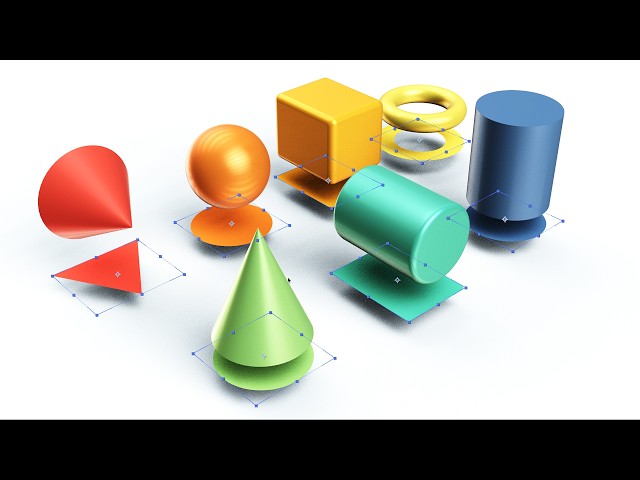
Free After Effects Script: Instantly Convert 2D Shape Layers to Native 3D Meshes (Shape2Primitive)
выпускать: 2026/04/01 13:38 читать: 0
Оригинальный автор:Motion Boutique
Первоисточник:https://www.youtube.com/embed/aw-jaa2bZNE
*Shape2Primitive:* Free 2D to 3D Parametric Mesh Converter for After Effects Shape2Primitive is a free, lightweight After Effects script designed to instantly convert your 2D shape layers into native 3D Parametric Meshes. It maps your 2D sizes, colors, and animations directly onto 3D objects, perfectly preserving your anchor points and world space. It handles the complex math of geometric offsets so your 3D meshes align flawlessly with your original 2D composition. Shape2Primitive is not a product developed by Motion Boutique. It is an independent, third-party tool. The idea and concept were created by Good Rond. *Download / Get the free script here:* https://goodrond.gumroad.com/l/Shape2Primitive *Key Features:* Smart Auto-Detection: Select your 2D Shape Layers and click Convert to 3D. The script automatically assigns the correct 3D primitive based on your 2D shape's properties, such as turning an Ellipse into a Sphere, or a Rectangle into a Cube. *Powerful Options:* Use "Simulate floor (Z-shift)" to push the 3D object up on the Z-axis by exactly half of its thickness, making it sit perfectly flat on your ground plane, which is highly useful for 2D physics engines like Newton. You can also "Tilt Cones on their side" flat on the ground, which isolates the 3D anchor point to prevent coordinate drifts and is great for standard animations or top-down physics simulations. Additionally, you can choose to hide or completely delete your original 2D source layers to keep your timeline clean. *Custom Control:* If the auto-detection doesn't give the expected result, simply add a keyword to your shape layer's name to force a specific 3D mesh, using keywords like torus, cylinder, or cone. You can also use the "Color Trick": if you are using gradients in 2D but want a specific flat color in 3D, add a solid fill to your shape and hide it, and the script will read that hidden fill. *Important Setup Note:* Before clicking "Convert", the script needs 3D reference models to duplicate. Currently, the Adobe After Effects scripting API does not allow scripts to generate native 3D meshes from scratch. You must have the native 3D mesh layers (Sphere, Cube, Cone, Torus, Cylinder) already present in your composition. You can simply create them from the AE Layer menu, keep their default names, and hide and lock them at the bottom of your comp. Credits: Idea & Concept Good Rond Code: Gemini.
свежие новости
Более>>-
 Stock Inspired
2026-04-02 00:33
Stock Inspired
2026-04-02 00:33
-
 Mudrex
2026-04-02 00:33
Mudrex
2026-04-02 00:33
-
 Motion Boutique
2026-04-02 00:33
Motion Boutique
2026-04-02 00:33
-
 Crypto Crow
2026-04-02 00:33
Crypto Crow
2026-04-02 00:33
-
 Heliox
2026-04-02 00:33
Heliox
2026-04-02 00:33
-
 We Make Trillioner
2026-04-01 22:38
We Make Trillioner
2026-04-01 22:38
-
 加密龐克
2026-04-01 22:20
加密龐克
2026-04-01 22:20
-
 Max Gaming
2026-04-01 22:20
Max Gaming
2026-04-01 22:20
-
![Yeoul [GD]](/uploads/20260401/177505087669cd207c656aa.jpg "Yeoul [GD]") Yeoul [GD]
2026-04-01 22:01
Yeoul [GD]
2026-04-01 22:01
Рекомендуемые темы
-
- Деятельность китов Dogecoin
- Получите самую свежую информацию о деятельности китов Dogecoin с помощью нашего всестороннего анализа. Узнайте о тенденциях, закономерностях и влиянии этих китов на рынок Dogecoin. Будьте в курсе нашего экспертного анализа и будьте впереди в своем путешествии по криптовалюте.
-
- Майнинг Догекоин
- Майнинг Dogecoin — это процесс добавления новых блоков транзакций в блокчейн Dogecoin. Майнеры награждаются новыми Dogecoin за свою работу. В этой теме представлены статьи, связанные с майнингом Dogecoin, в том числе о том, как добывать Dogecoin, о лучшем оборудовании и программном обеспечении для майнинга, а также о прибыльности майнинга Dogecoin.
-
- Запуск космического корабля Spacex
- В этой теме представлены статьи, связанные с запусками космических кораблей SpaceX, включая даты запуска, детали миссии и статус запуска. Будьте в курсе последних запусков космических кораблей SpaceX с помощью этого информативного и всеобъемлющего ресурса.
-
- Король мемов: Dogecoin
- В этой теме представлены статьи, связанные с самыми популярными мемами, в том числе «Король мемов: Dogecoin». Memecoin стал доминирующим игроком в криптопространстве. Эти цифровые активы популярны по ряду причин. Они управляют самыми инновационными аспектами блокчейна.
Избранные статьи
Более>>- 1 北极Pablo硬币(APC):揭开地球的奥秘,一次预售
- 2 Dogecoin,Pepe和Shiba Inu的新高点在2025年,但这个加密货币可能会以10,000%的收益偷走该节目
- 3 唐纳德·特朗普总统宣布加密战略储备后,梅米硬币的道路起义(DUP)可以100倍
- 4 Dogecoin(Doge)价格预测:到2025年底,Meme硬币可以达到10美元吗?
- 5 卡达诺(Cardano)的查尔斯·霍斯金森(Charles Hoskinson)对比特币和狗狗币发表了一些著名的评论
- 6 云挖掘热潮:比特币,狗狗和对被动加密收入的追求
- 7 Grayscale、Dogecoin 和 ETF 首次亮相:Meme 币的新时代?
- 8 Rexas Finance(RXS)到2025年可能会激增10倍,超过Pepe(Pepe)
- 9 比特币交易员在Doge上赚了3000万美元,预测这笔0.0000002 AI代币的激增6,000% - 获得80%的奖金令牌
- 10 Dogecoin(Doge)价格预测:Meme Coin可能会升至0.27美元
Выберите валюту

US Dollar
USD

Chinese Yuan
CNY

Japanese Yen
JPY

South Korean Won
KRW

New Taiwan Dollar
TWD

Canadian Dollar
CAD

Euro
EUR

Pound Sterling
GBP

Danish Krone
DKK

Hong Kong Dollar
HKD

Australian Dollar
AUD

Brazilian Real
BRL

Swiss Franc
CHF

Chilean Peso
CLP

Czech Koruna KČ
CZK

Singapore Dollar
SGD

Indian Rupee
INR

Saudi Riyal
SAR
Vietnamese Dong
VND

Thai Baht
THB
Выберите валюту
-
US Dollar
USD-$

-
Chinese Yuan
CNY-¥
-
Japanese Yen
JPY-¥
-
South Korean Won
KRW -₩
-
New Taiwan Dollar
TWD-NT$
-
Canadian Dollar
CAD-$
-
Euro
EUR - €
-
Pound Sterling
GBP-£
-
Danish Krone
DKK-KR
-
Hong Kong Dollar
HKD- $
-
Australian Dollar
AUD-$
-
Brazilian Real
BRL -R$
-
Swiss Franc
CHF -FR
-
Chilean Peso
CLP-$
-
Czech Koruna KČ
CZK -KČ
-
Singapore Dollar
SGD-S$
-
Indian Rupee
INR -₹
-
Saudi Riyal
SAR -SAR
-
Vietnamese Dong
VND-₫
-
Thai Baht
THB -฿