-
цена: $0.15090 2.9605%
-
Рыночная стоимость: 22.92B 0.7601%
-
Оборот (24h): 1.55B 0%
-
Dominance: 0.7601% 0.7601%
-
цена: $0.15090 2.9605%

Secure OpenClaw with HTTPS - Caddy Reverse Proxy on AWS EC2 (No Domain)
выпускать: 2026/05/31 18:18 читать: 0
Оригинальный автор:KGP Talkie
Первоисточник:https://www.youtube.com/embed/EddjTJMT83Y
Access your OpenClaw dashboard over real, trusted HTTPS — no more "connection is not secure" warnings, no SSH tunnel, and no domain to buy. In this step-by-step tutorial you'll put a Caddy reverse proxy in front of OpenClaw on your AWS EC2 instance, get a free auto-renewing SSL certificate using nip.io, and reach your dashboard securely from anywhere. This is the security video in the OpenClaw series. It assumes OpenClaw is already installed on AWS and connected to a free AI API (earlier videos — linked below). Here we focus on one thing: a proper, production-grade HTTPS setup. The gateway stays private on loopback, only Caddy is exposed, and device pairing means even with the token no unapproved browser can connect. I left the secure-context error and device-pairing prompt in on purpose so you know exactly how to handle them. ⏱ Chapters: 0:00 The problem: insecure dashboard & why HTTPS 1:33 What we're building (Caddy reverse proxy on EC2) 1:56 Connect to EC2 & install Caddy 2:35 Write the Caddyfile (nip.io host) 4:14 Let OpenClaw automate the gateway + origin config 6:49 Update the AWS security group (open 80 & 443) 9:24 Reverse proxy working — access over HTTPS 10:16 Stop the SSH tunnel & connect with the token 11:48 Fix the allowed-origin issue (via the Discord bot) 13:20 Restart the gateway & approve the device 14:19 Live HTTPS dashboard — no tunnel, no domain 15:04 Why this is the production-grade way + wrap-up 🔗 Commands & setup (replace 3-87-144-160 with YOUR EC2 IP, dots → dashes): ⚠️ Use an Elastic IP first. If your IP isn't elastic it changes on reboot and the cert + Caddyfile + origin all break. EC2 → Elastic IPs → Allocate → Associate. 1) Install Caddy sudo apt-get update && sudo apt-get install -y caddy 2) Write the Caddyfile → sudo nano /etc/caddy/Caddyfile 3-87-144-160.nip.io { reverse_proxy 127.0.0.1:18789 } 3) Point OpenClaw's gateway + origin openclaw config set gateway.bind loopback openclaw config set gateway.controlUi.allowedOrigins '["https://3-87-144-160.nip.io"]' --strict-json openclaw gateway restart 4) Restart Caddy & watch the cert issue sudo systemctl restart caddy sudo journalctl -u caddy -f (wait for "certificate obtained successfully", then Ctrl+C) 5) AWS Security Group Open 80 → 0.0.0.0/0 | Open 443 → 0.0.0.0/0 | Remove 18789 | Keep 22 → My IP 6) Open the dashboard https://3-87-144-160.nip.io/ ✅ Verify sudo systemctl status caddy --no-pager # active (running) curl -I https://3-87-144-160.nip.io # HTTP/2 200 openclaw status # gateway running 📺 Watch first / Full series: • Part 1 — Set up OpenClaw on AWS EC2 with a Free AI API: https://www.youtube.com/watch?v=IV3t-MD8AaM • Part 2 — Connect OpenClaw to Discord (free AI bot): https://youtu.be/Kzvmbt0nFDA • Full OpenClaw series playlist: https://www.youtube.com/playlist?list=PLc2rvfiptPSQMZf3rlYZZ8vwUBcm6jv4d 💬 Join our Discord community (ask questions, get help): https://discord.gg/Nv7zm39rPC 🎓 Go deeper — my Udemy courses: • Build & own AI agents → Master LangChain v1 and Ollama: https://kgptalkie.com/langchain • Connect tools the right way → MCP Mastery (Claude, LangChain, Ollama): https://kgptalkie.com/mcp If this helped you secure your OpenClaw dashboard, hit 👍 and drop a comment telling me what to secure or automate next. I read every comment. Subscribe and turn on the 🔔 — the OpenClaw series drops step by step. #OpenClaw #Caddy #HTTPS
свежие новости
Более>>-
 Gerhard - Bitcoin Strategy
2026-06-16 20:32
Gerhard - Bitcoin Strategy
2026-06-16 20:32
-
 破晓动漫社 Dawn Anime Club
2026-06-16 20:32
破晓动漫社 Dawn Anime Club
2026-06-16 20:32
-
 破繭短劇ShortTV
2026-06-16 20:32
破繭短劇ShortTV
2026-06-16 20:32
-
 Lisa聊美股
2026-06-16 20:32
Lisa聊美股
2026-06-16 20:32
-
 Joyland-Animation
2026-06-16 19:36
Joyland-Animation
2026-06-16 19:36
-
 幻彩動漫解說閣
2026-06-16 18:56
幻彩動漫解說閣
2026-06-16 18:56
-
 趣说漫世界
2026-06-16 18:56
趣说漫世界
2026-06-16 18:56
-
 卡通狂欢嘉会 Cartoon Gala
2026-06-16 18:36
卡通狂欢嘉会 Cartoon Gala
2026-06-16 18:36
-
 Crypto Banter
2026-06-16 18:36
Crypto Banter
2026-06-16 18:36
Рекомендуемые темы
-

- Деятельность китов Dogecoin
- Получите самую свежую информацию о деятельности китов Dogecoin с помощью нашего всестороннего анализа. Узнайте о тенденциях, закономерностях и влиянии этих китов на рынок Dogecoin. Будьте в курсе нашего экспертного анализа и будьте впереди в своем путешествии по криптовалюте.
-

- Майнинг Догекоин
- Майнинг Dogecoin — это процесс добавления новых блоков транзакций в блокчейн Dogecoin. Майнеры награждаются новыми Dogecoin за свою работу. В этой теме представлены статьи, связанные с майнингом Dogecoin, в том числе о том, как добывать Dogecoin, о лучшем оборудовании и программном обеспечении для майнинга, а также о прибыльности майнинга Dogecoin.
-

- Запуск космического корабля Spacex
- В этой теме представлены статьи, связанные с запусками космических кораблей SpaceX, включая даты запуска, детали миссии и статус запуска. Будьте в курсе последних запусков космических кораблей SpaceX с помощью этого информативного и всеобъемлющего ресурса.
-
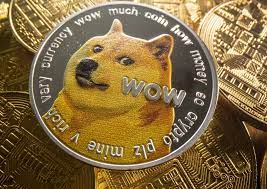
- Король мемов: Dogecoin
- В этой теме представлены статьи, связанные с самыми популярными мемами, в том числе «Король мемов: Dogecoin». Memecoin стал доминирующим игроком в криптопространстве. Эти цифровые активы популярны по ряду причин. Они управляют самыми инновационными аспектами блокчейна.
Избранные статьи
Более>>- 1 北极Pablo硬币(APC):揭开地球的奥秘,一次预售
- 2 Dogecoin,Pepe和Shiba Inu的新高点在2025年,但这个加密货币可能会以10,000%的收益偷走该节目
- 3 唐纳德·特朗普总统宣布加密战略储备后,梅米硬币的道路起义(DUP)可以100倍
- 4 Dogecoin(Doge)价格预测:到2025年底,Meme硬币可以达到10美元吗?
- 5 卡达诺(Cardano)的查尔斯·霍斯金森(Charles Hoskinson)对比特币和狗狗币发表了一些著名的评论
- 6 云挖掘热潮:比特币,狗狗和对被动加密收入的追求
- 7 Grayscale、Dogecoin 和 ETF 首次亮相:Meme 币的新时代?
- 8 Rexas Finance(RXS)到2025年可能会激增10倍,超过Pepe(Pepe)
- 9 比特币交易员在Doge上赚了3000万美元,预测这笔0.0000002 AI代币的激增6,000% - 获得80%的奖金令牌
- 10 Dogecoin(Doge)价格预测:Meme Coin可能会升至0.27美元
Выберите валюту

US Dollar
USD

Chinese Yuan
CNY

Japanese Yen
JPY

South Korean Won
KRW

New Taiwan Dollar
TWD

Canadian Dollar
CAD

Euro
EUR

Pound Sterling
GBP

Danish Krone
DKK

Hong Kong Dollar
HKD

Australian Dollar
AUD

Brazilian Real
BRL

Swiss Franc
CHF

Chilean Peso
CLP

Czech Koruna KČ
CZK

Singapore Dollar
SGD

Indian Rupee
INR

Saudi Riyal
SAR

Vietnamese Dong
VND

Thai Baht
THB
Выберите валюту
-
US Dollar
USD-$

-
Chinese Yuan
CNY-¥
-
Japanese Yen
JPY-¥
-
South Korean Won
KRW -₩
-
New Taiwan Dollar
TWD-NT$
-
Canadian Dollar
CAD-$
-
Euro
EUR - €
-
Pound Sterling
GBP-£
-
Danish Krone
DKK-KR
-
Hong Kong Dollar
HKD- $
-
Australian Dollar
AUD-$
-
Brazilian Real
BRL -R$
-
Swiss Franc
CHF -FR
-
Chilean Peso
CLP-$
-
Czech Koruna KČ
CZK -KČ
-
Singapore Dollar
SGD-S$
-
Indian Rupee
INR -₹
-
Saudi Riyal
SAR -SAR
-
Vietnamese Dong
VND-₫
-
Thai Baht
THB -฿